
AI Trading Assistant
Agent Pear, your AI trading assistant
Agent Pear turns a hunch into a trade. Ask it a question in plain English, typed or spoken, and it researches the market, reasons through the relationships, and hands you a structured pair or basket you can open in one tap. It's the fastest path from "I think ETH outperforms here" to a live, risk-managed position.
Agent Pear is open to everyone: free to use, with no separate agent fee (trading still pays the usual Pear and venue fees). It lives on Telegram (direct messages) and in the Pear V3 web app chat, and it works on your trade accounts throughout.
Where it runs and what each surface can do
- Telegram DM: full assistant: chat, voice notes, charts, market signals, trade execution, and your account tooling (see commands below).
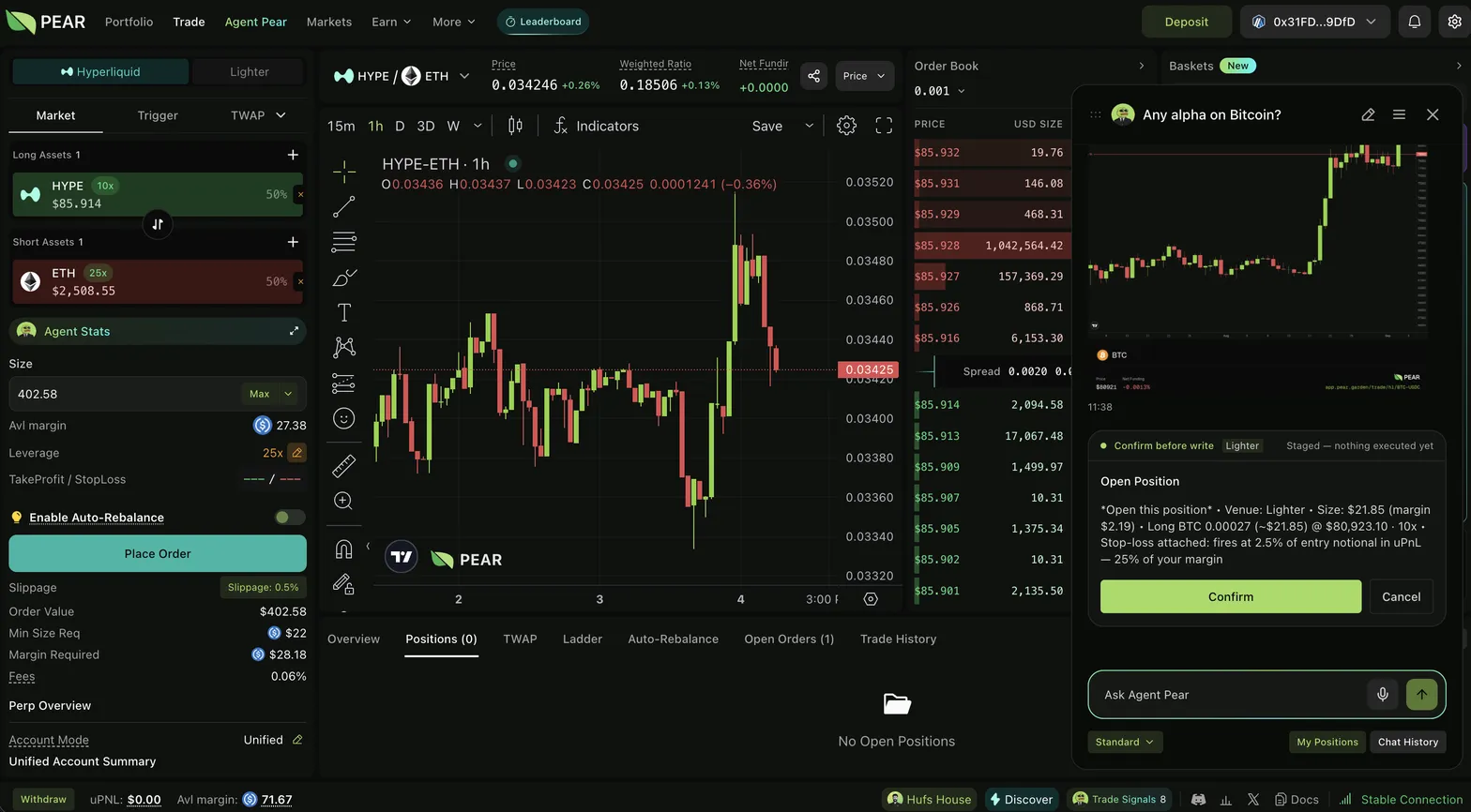
- Pear V3 web app: the same assistant in chat: research, tickets, execution, journal, personalization.
- Telegram groups, Pear Pro, Pear Base app (mini-app): analysis only: Agent Pear chats and prepares trades but never offers to execute there.
- X (Twitter): read-only replies: tag @agent_pear and it answers with analysis and commentary.
Talk to it typed or spoken
Ask anything:
- "What's the outlook for ETH?"
- "Any alpha on Bitcoin right now?"
- "What pairs are trending?"
- "Review my basket."
- "Show me my open positions."
Replies stream in real time and can include the agent's reasoning, live market data, plus web and X (Twitter) citations (so you can check its sources). Voice notes are transcribed before anything is sent, so a spoken idea never fires a trade on its own. You can also paste a chart or PnL screenshot and Agent Pear will read the setup. An image is context and can propose a trade, but it never auto-executes. (Agent Pear is optimized for English; other languages work at baseline quality.)
What it analyzes
Agent Pear speaks quant: correlation, cointegration, z-scores, hedge ratio, half-life, volatility, funding, and backtest statistics for any pair or basket, and it explains them in plain language. It surfaces today's active signals, candidates, and the weekly featured trade (see Agent Pear Signals).
Execution: tickets, and a fully-auto mode
Execution is a toggle (/trade on|off on Telegram; the same switch in the web app). Turn it off and Agent Pear is an analysis-only assistant.
When execution is on:
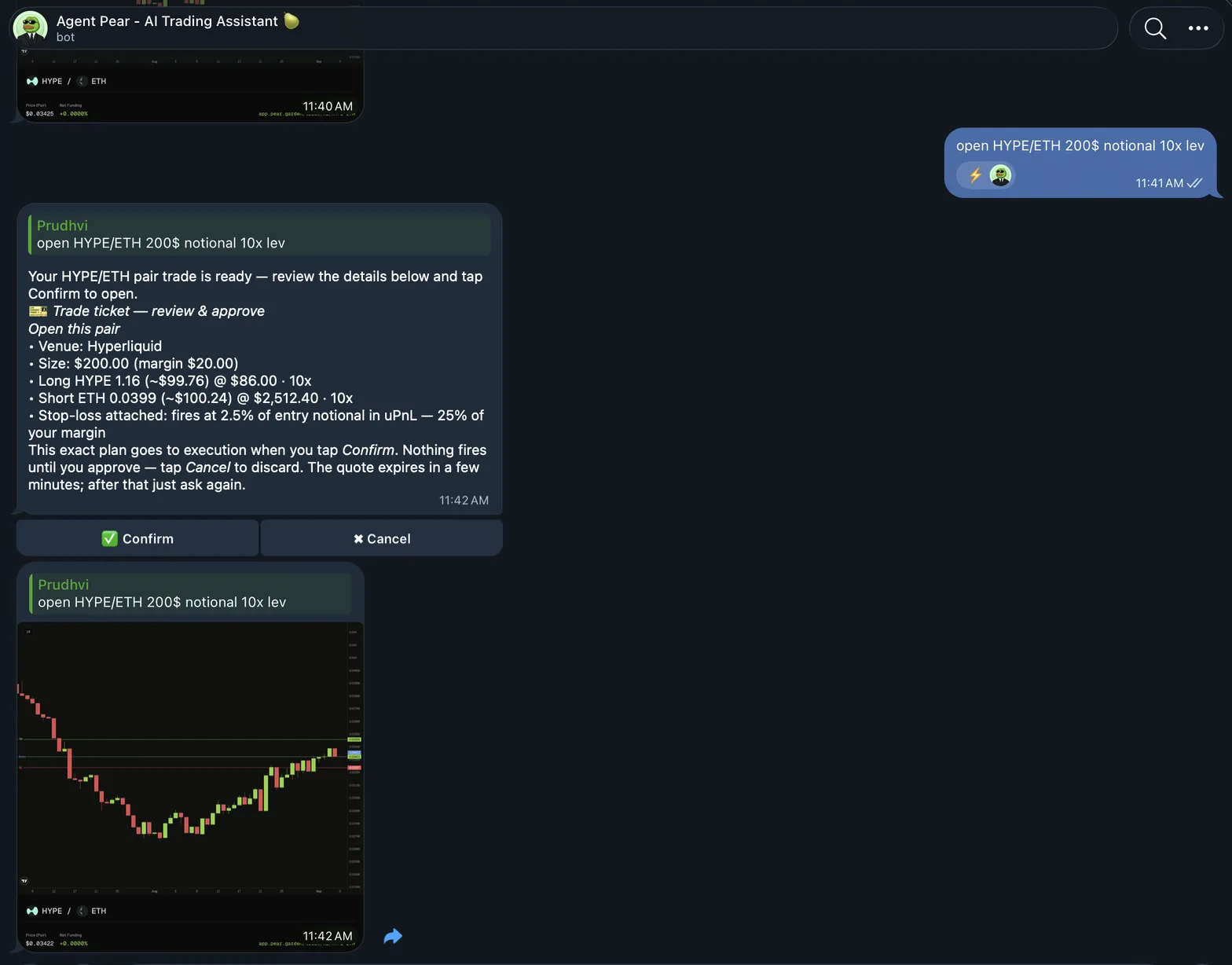
- Default (tickets): every money-moving request is priced and sized against your live account first and comes back as a trade ticket describing exactly what will be sent to the execution engine (legs, sizes, leverage). Nothing reaches the market until you approve it, and each approval is single-use. Planning is not placing.
- Optional (fully-auto): flip on auto mode (in Telegram DM or the web app) and Agent Pear can execute your direct requests without a per-trade confirmation card. This applies to requests you make interactively. Agent Pear does not trade on its own in the background.
Setting up execution
- Link your wallet on the web app (app.pear.garden). On Telegram,
/linkwallettakes you through the same flow. The wallet link is universal: venues are separate trade accounts sharing one wallet link. - Follow the setup steps: funding (for new users) and connecting your Hyperliquid and/or Lighter trade accounts at app.pear.garden.
Execution runs on your Hyperliquid and Lighter accounts with the same fee schedule and order types as the app: Market, Trigger, TWAP, and Ladder opens; TP/SL, trails, and triggers as exits. Closes are Market or TWAP. Conditional opens need a Pear Pro account. See Trading fees.
What Agent Pear can't do
- Standing auto-rebalance: automatic rebalancing is a Pear app feature; the agent can rebalance a position to target weights once on request.
- Resting limit orders: there are no limit orders; every fill is a market fill.
- Deposits, withdrawals, or bridging: it observes and trades your linked accounts only.
- Spot trading, watchlists, or paper-trading mode.
- Trading on venues other than Hyperliquid and Lighter.
Telegram commands (DMs unless noted)
| Command | What it does |
|---|---|
/aipear <question> | Ask Agent Pear anything (also works in groups) |
/pc, /bc, /ac, /perfc | Chart commands: pair ratio, basket ratio, asset candles, performance charts |
/linkwallet · /unlinkwallet | Connect / disconnect the wallet that powers execution |
/trade on|off|status | Execution toggle and status |
/trade confirmations on|off | Turn confirm-before-write tickets on/off (on by default) |
/trade accounts · /trade default | List trade accounts per venue; set the default |
/trade history | Paginated closed-trade history with PnL |
/portfolio · /resync | Account balance + open positions; force re-sync from the venue |
/prefs | View/edit your trading preferences |
/journal · /memory | Your auto-journaled closed trades; what the agent has learned about you |
/tasks · /cancel | List/cancel scheduled monitoring tasks (max 3, 15-min minimum interval, 7-day lifespan) |
/notifications | TP/SL, trigger, and liquidation alerts |
/signals on|off | Market-signal pings (on by default for wallet-linked users) |
/flex | Share PnL cards to X |
/connectx · /disconnectx | Connect / disconnect your X account |
/ref | Referral code, invite link, referees (fully in chat) |
/clear | Clear session history (learned memory and journal survive) |
/id · /help | Diagnostics and usage guide |
Trade actions (open, close, adjust, TP/SL, baskets, suggestions) are plain language, not slash commands. Just ask.
Standard vs Advanced research
The web app chat offers two research modes per question: Standard (quick, focused) and Advanced (deeper research across more sources). Telegram runs standard mode.
Memory, journal & personalization
Agent Pear keeps a journal of every closed trade automatically (why it was opened, what happened, one takeaway) and builds a durable memory of how you trade from your conversations. Set your profile explicitly: experience, trading style, risk appetite, plus free-text notes (assets to avoid, sectors you favor), and it respects them. See Agent Pear Statistics for the quant terms it uses, and Agent Pear Signals for the signal product.